Once you have successfully compiled the C program, it creates an executable file. You execute/run the program. The question arises is “How does this program gets run on the target?”. Target can be both a Microprocessor or Microcontroller.
In order to understand this, we need to first understand little bit about the Central Processing Unit (CPU) and its interaction with memory(RAM) and Storage (Filesystem).
Central Processing Unit (CPU)
A CPU, or Central Processing Unit, is the primary component of a computing system responsible for executing instructions of a program. Here the instructions are nothing but Machine Code Instructions.
A CPU understands a low level “machine code” language (also known as “native code”). The language of the machine code is hardwired into the design of the CPU hardware; it is not something that can be changed at will. Each CPU architecture f(e.g. Intel x86, ARM) has its own, idiosyncratic machine code which is not compatible with the machine code of other CPU architectures.
Machine Code Instructions or Opcodes, are the binary representations of the instructions that a computer’s central processing unit (CPU) can execute directly. Machine code is the lowest-level programming language and is specific to the architecture of the CPU. Each machine code instruction corresponds to a specific operation that the CPU can perform, such as arithmetic operations, data movement, control flow, and more.
As C is a high level programming language. Compiler takes care of converting C code in to Machine Code. Your executable file just contains that.
Memory allocation in RAM and Memory Layout of C Program
When you run the program, the Operating system(OS) starts a process.
A process is an instance of a program running in a computer. This process gets its own memory area allocated in RAM. That is what we call a Memory Layout.
HighAddresses ---> .----------------------.
                    |      Environment     | Environment variales & command line arguments.
                    |----------------------|
                    |                      |   Functionsand variable are declared
                    |         STACK        |   on the stack.
base pointer ->     | - - - - - - - - - - -|
                    |           |          |
                    |           v          |
                    :                      :
                    .                      .   The stack grows down into unused pace
                    .         Empty        .   while the heap grows up.
                    .                      .
                    .                      .   (other memory maps do occur here such
                    .                      .    as dynamic libraries, and different memory
                    :                      :    allocate)
                    |           ^          |
                    |           |          |
 brk point ->       | - - - - - - - - - - -|   Dynamic memory is declared on the heap
                    |          HEAP        |
                    |                      |
                    |----------------------|
                    |          BSS         |   Uninitialized data (BSS)
                    |----------------------|
                    |          Data        |   Initialized data (DS)
                    |----------------------|
                    |          Text        |   Binary code
LowAddresses ----> '----------------------'
- Text or Code Segment: When we compile a program a binary gets generated. Suppose we generate a.exe for a hello world c program. a.exe consists of the instructions and these instructions are stored in the text segment. Text segment is read only and shared memory.
- Initialized Data Segment: Initialized data segment or simply the Data Segment stores all global, static, constant and external variables that are initialized beforehand. Data segment is not read only since it can be changed during run time. Data segment can further be classified as read only area and read write area. The variable initialized as const will come under read only area. Remaining all will come under read write area.
- Uninitialized Data Segment: Uninitialized data segment is also known as bss(block started by symbol) segment. It contains all uninitialized global and static variables. All variables in this segment initialized by the zero(0) and pointer with the null pointer.
- Heap: Dynamic memory allocation takes place in heap. Stack segment mostly begins at the end of the BSS segment and grows upwards to higher memory addresses. Using malloc() and calloc() we can allocate memory in heap. The heap area is shared by all shared libraries and dynamically loaded modules in a process.
- Stack: Stack is located at a higher address and grows and shrinks opposite to the heap segment. All local variables are stored in stack segment. Also stack segment is used for passing arguments to the functions along with the return address of the instruction which is used to be executed after the function call is over. Local variables have a scope to the block which they are defined in, they are created when control enters into the block.
- Command Line Arguments: Command line arguments like argc and argv, and environment variables are stored in this memory.
We will see memory allocation in greater detail in future.
Program Execution
The execution of code in a CPU involves a series of steps, and it’s helpful to understand the basic concepts of the instruction cycle and the fetch-decode-execute cycle.
- Fetch: The first step is the fetch phase. The CPU fetches the next instruction from memory. The instruction pointer (IP) or program counter (PC) keeps track of the memory address of the next instruction to be executed.
- Decode: In the decode phase, the fetched instruction is decoded to determine the operation to be performed. The control unit of the CPU interprets the opcode (operation code) of the instruction and prepares the necessary internal signals to execute the operation.
- Execute: The execute phase is where the actual operation specified by the instruction is carried out. This might involve arithmetic or logical operations, data movement, or control flow changes. The execution modifies the state of the CPU, such as updating registers and flags.
The fetch-decode-execute cycle repeats for each instruction in the program. The instruction pointer is updated to point to the next instruction, and the process continues until the program completes or encounters a branching instruction.

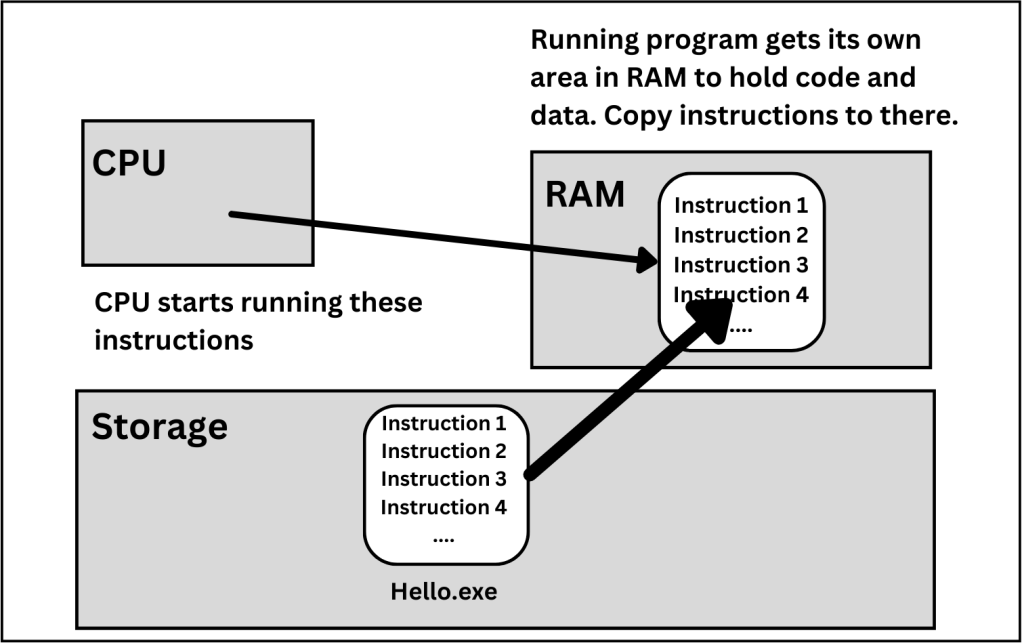
When you double-click the program, the operating system “launches” the program, doing the housekeeping steps of allocating an area of memory within RAM for the program, loading the first section of the program’s machine code into that memory, and finally directing the CPU to start running that code.
Here is the Whole Picture – Scenarios.
Discover more from Embedded for All
Subscribe to get the latest posts sent to your email.
 Embedded for All